Recreating the <filedset> component and its <legend>
Using a minimal HTML code and modern CSS to recreate the <fieldset> component. A responsive implementation easy to control using CSS variables. It's also direction-aware with real transparency!
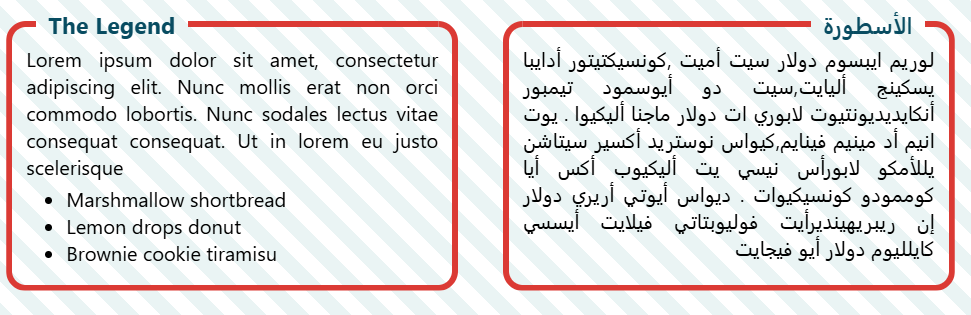
<div class="fieldset">
  <h3>The Legend</h3>
  <!-- place your content here  -->
</div>
.fieldset {
--r: 20px; /* radius of the box */
--p: 1em; /* padding of the box */
--b: 6px; /* border thickness */
--g: 12px; /* gap between the legend and border */
--o: 10px; /* to offset the legend from the side */
--c: #db3a34;
padding: var(--p);
position: relative;
z-index: 0;
display: flow-root; /* to avoid margin collapsing */
}
.fieldset h3 {
margin:
calc(var(--b)/2 - .5lh - var(--p))
calc(var(--r) - var(--p))
calc(var(--p) - .5lh - var(--b)/2);
display: flex;
gap: var(--g);
}
.fieldset h3:before,
.fieldset h3:after {
content: "";
border-top: var(--b) solid var(--c);
width: var(--o);
margin-top: calc(.5lh - var(--b)/2)
}
.fieldset h3:after {
flex: 1;
}
.fieldset:before {
content:"";
position: absolute;
z-index: -1;
inset: 0;
border-radius: var(--r);
border: var(--b) solid var(--c);
clip-path: polygon(0 0,var(--r) 0,var(--r) 50%,calc(100% - var(--r)) 50%, calc(100% - var(--r)) 0,100% 0,100% 100%,0 100%);
}See the Pen Recreating <fieldset> (and <legend>) using CSS by Temani Afif (@t_afif) on CodePen.
More CSS Tips
- How to use the "auto" value with clamp() A CSS trick to use clamp() with sizing values like auto, min-content, max-content, etc.
- Elastic/Bouncy Text Effect A few lines of modern CSS to create a fancy elastic effect on hover.
- Connecting Circles With Anchor Positioning II Connect circles with arrows and show their distance using modern CSS.
- Responsive Hexagon Grid without Media Queries A few lines of modern CSS to create a responsive grid of hexagon shapes (and more!).