Confetti Shape Explosion using random()
Do you want a cool hover effect? Using random() and modern features, you can explode any border-only shape into confetti!
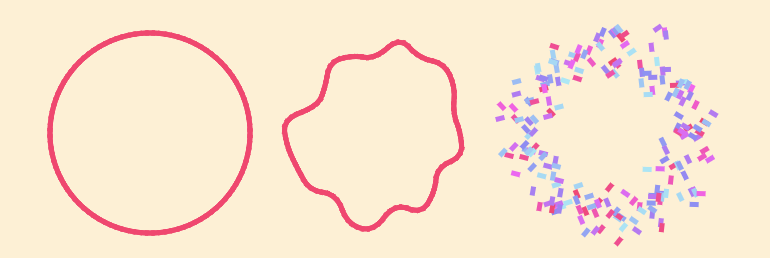
<div class="shape">
  <i></i> <i></i> <i></i> <i></i>
  <!-- the more <i>, the more confetti! -->
</div>
@property --i {syntax: "<integer>";initial-value: 0;inherits: true}
@property --n {syntax: "<integer>";initial-value: 0;inherits: true}
.shape {
--d: 18px; /* control the explosion distance */
--s: shape(...); /* it can be polygon() or any shape function */
position: relative;
}
.shape i {
--i: sibling-index();
--n: sibling-count();
}
.shape i:before,
.shape i:after {
content: "";
position: absolute;
height: 5px; /* this controls the thickness */
aspect-ratio: 1.75;
background: color-mix(in hsl,#ef476f random(0%,100%),#ade8f4);
translate: random(-1*var(--d),var(--d)) random(-1*var(--d),var(--d));
offset: var(--s) calc(var(--i)*100%/var(--n));
transition: .3s;
}
.shape:not(:hover) {
--d: 0px;
}
.shape:not(:hover) i:before,
.shape:not(:hover) i:after {
background: #ef476f;
}⚠️ Chromium-only for now ⚠️
See the Pen Confetti Shape explosion (hover to explode!) by Temani Afif (@t_afif) on CodePen.
Want to apply this to an SVG shape? Use my online converter to get the shape() code, then update the --s variable and the aspect-ratio.
Example with the CodePen and CSS Tricks logos
See the Pen Codepen and CSS Tricks confetti explosion! by Temani Afif (@t_afif) on CodePen.
More CSS Tips
- Random Wavy Dividers Combining shape() and random() to create fancy wavy dividers.
- Implementing children-count() using Modern CSS Using Scroll-Driven Animations to count the number of children.