Convert Complex SVG Shapes into CSS
I updated the SVG-to-CSS converter to support multiple path elements rather than just a single path. Now, you can easily convert complex SVG shapes into CSS.
You will get a responsive code created using a single element and a single shape() function. You can also have the border-only version using border-shape.
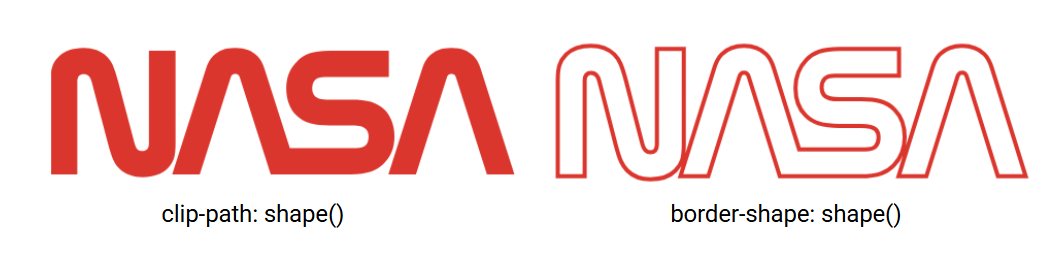
Example of a complex SVG shape:
<path d="M91.991,104.699c1.576,5.961,4.119,8.266,8.613,8.266c4.659,0,7.102-2.799,7.102-8.266V3.2h29.184v101.499 c0,14.307-1.856,20.506-9.11,27.762c-5.228,5.229-14.871,9.271-27.047,9.271c-9.837,0-19.25-3.256-25.253-9.27 c-5.263-5.273-8.154-10.689-12.672-27.764L44.9,37.033c-1.577-5.961-4.119-8.265-8.613-8.265c-4.66,0-7.103,2.798-7.103,8.265 v101.5H0v-101.5C0,22.727,1.857,16.527,9.111,9.271C14.337,4.044,23.981,0,36.158,0c9.837,0,19.25,3.257,25.253,9.27 c5.263,5.273,8.154,10.689,12.672,27.764L91.991,104.699z"/>
<path d="M478.038,138.533L444.334,33.096c-0.372-1.164-0.723-2.152-1.263-2.811 c-0.926-1.127-2.207-1.719-3.931-1.719c-1.723,0-3.004,0.592-3.931,1.719c-0.539,0.658-0.891,1.646-1.262,2.811l-33.703,105.437 h-30.167l36.815-115.177c1.918-6,4.66-11.094,8.139-14.488C421.002,3.047,428.038,0,439.141,0s18.14,3.047,24.109,8.867 c3.479,3.395,6.221,8.488,8.14,14.488l36.814,115.177H478.038z"/>
<path d="M328.878,138.533c19.12,0,28.446-4.062,35.814-11.389c8.153-8.105,12.053-16.973,12.053-30.213 c0-11.699-4.283-22.535-10.804-29.019c-8.526-8.479-19.116-11.151-36.384-11.151L305.37,56.76c-9.242,0-12.925-1.117-15.839-3.98 c-2.001-1.964-2.939-4.885-2.939-8.328c0-3.559,0.857-7.074,3.303-9.475c2.171-2.131,5.13-3.109,10.816-3.109h69.903V3.2H306.05 c-19.12,0-28.445,4.063-35.814,11.389c-8.152,8.105-12.053,16.972-12.053,30.212c0,11.701,4.283,22.536,10.804,29.019 c8.527,8.479,19.116,11.152,36.384,11.152l24.188,0.002c9.242,0,12.925,1.115,15.839,3.979c2.001,1.965,2.939,4.885,2.939,8.328 c0,3.559-0.857,7.074-3.302,9.475c-2.172,2.131-5.131,3.109-10.817,3.109h-72.094l-27.651-86.509 c-1.918-6-4.66-11.094-8.139-14.488C220.363,3.047,213.327,0,202.224,0s-18.14,3.047-24.108,8.867 c-3.48,3.395-6.221,8.488-8.139,14.488l-36.815,115.177h30.166l33.704-105.437c0.372-1.164,0.723-2.152,1.263-2.811 c0.926-1.127,2.208-1.719,3.931-1.719s3.004,0.592,3.931,1.719c0.54,0.658,0.891,1.646,1.262,2.811l33.704,105.437H328.878z"/>
It will get converted to:
.shape {
  aspect-ratio: 3.586;

  clip-path: shape(from 18.1% 73.87%,curve by 1.69% 5.83% with 0.31% 4.21%/0.81% 5.83%,curve by 1.4% -5.83% with 0.92% 0%/1.4% -1.97%,vline to 2.26%,hline by 5.74%,vline by 71.61%,curve by -1.79% 19.59% with 0% 10.09%/-0.37% 14.47%,curve by -5.32% 6.54% with -1.03% 3.69%/-2.93% 6.54%,curve by -4.97% -6.54% with -1.94% 0%/-3.79% -2.3%,curve by -2.49% -19.59% with -1.04% -3.72%/-1.6% -7.54%,line to 8.84% 26.13%,curve by -1.69% -5.83% with -0.31% -4.21%/-0.81% -5.83%,curve by -1.4% 5.83% with -0.92% 0%/-1.4% 1.97%,vline by 71.61%,hline to 0%,vline by -71.61%,curve to 1.79% 6.54% with 0% 16.04%/0.37% 11.66%,curve to 7.11% 0% with 2.82% 2.85%/4.72% 0%,curve by 4.97% 6.54% with 1.94% 0%/3.79% 2.3%,curve by 2.49% 19.59% with 1.04% 3.72%/1.6% 7.54%,line to 18.1% 73.87%,close,close,move to 94.06% 97.74%,line to 87.43% 23.35%,curve by -0.25% -1.98% with -0.07% -0.82%/-0.14% -1.52%,curve by -0.77% -1.21% with -0.18% -0.8%/-0.43% -1.21%,curve by -0.77% 1.21% with -0.34% 0%/-0.59% 0.42%,curve by -0.25% 1.98% with -0.11% 0.46%/-0.18% 1.16%,line by -6.63% 74.39%,hline by -5.94%,line by 7.24% -81.26%,curve by 1.6% -10.22% with 0.38% -4.23%/0.92% -7.83%,curve to 86.41% 0% with 82.84% 2.15%/84.23% 0%,smooth by 4.74% 6.26% with 3.57% 2.15%,curve by 1.6% 10.22% with 0.68% 2.4%/1.22% 5.99%,line by 7.24% 81.26%,hline to 94.06%,close,close,move to 64.71% 97.74%,curve by 7.05% -8.04% with 3.76% 0%/5.6% -2.87%,curve by 2.37% -21.32% with 1.6% -5.72%/2.37% -11.98%,curve by -2.13% -20.47% with 0% -8.25%/-0.84% -15.9%,curve by -7.16% -7.87% with -1.68% -5.98%/-3.76% -7.87%,line to 60.09% 40.05%,curve by -3.12% -2.81% with -1.82% 0%/-2.54% -0.79%,curve by -0.58% -5.88% with -0.39% -1.39%/-0.58% -3.45%,curve by 0.65% -6.69% with 0% -2.51%/0.17% -4.99%,curve by 2.13% -2.19% with 0.43% -1.5%/1.01% -2.19%,hline by 13.75%,vline to 2.26%,hline to 60.22%,curve by -7.05% 8.04% with -3.76% 0%/-5.6% 2.87%,curve by -2.37% 21.32% with -1.6% 5.72%/-2.37% 11.97%,curve by 2.13% 20.47% with 0% 8.26%/0.84% 15.9%,curve by 7.16% 7.87% with 1.68% 5.98%/3.76% 7.87%,line by 4.76% 0%,curve by 3.12% 2.81% with 1.82% 0%/2.54% 0.79%,curve by 0.58% 5.88% with 0.39% 1.39%/0.58% 3.45%,curve by -0.65% 6.69% with 0% 2.51%/-0.17% 4.99%,curve by -2.13% 2.19% with -0.43% 1.5%/-1.01% 2.19%,hline by -14.19%,line by -5.44% -61.04%,curve by -1.6% -10.22% with -0.38% -4.23%/-0.92% -7.83%,curve to 39.79% 0% with 43.36% 2.15%/41.98% 0%,smooth by -4.74% 6.26% with -3.57% 2.15%,curve by -1.6% 10.22% with -0.68% 2.4%/-1.22% 5.99%,line by -7.24% 81.26%,hline by 5.94%,line by 6.63% -74.39%,curve by 0.25% -1.98% with 0.07% -0.82%/0.14% -1.52%,curve by 0.77% -1.21% with 0.18% -0.8%/0.43% -1.21%,smooth by 0.77% 1.21% with 0.59% 0.42%,curve by 0.25% 1.98% with 0.11% 0.46%/0.18% 1.16%,line by 6.63% 74.39%,hline to 64.71%,close);
  /* OR */
  border-shape: /* same shape() code */;
}
The border-only version using border-shape is currently a Chrome-only feature.
See the Pen CSS-only Nasa Logo using shape() by Temani Afif (@t_afif) on CodePen.
How does it work? #
Multiple path elements can generally be merged into a single path element by simply concatenating the values of the d attribute.
<!-- this is the same  -->
<svg>
  <path d="M91.991 ... z"/>
  <path d="M478.038 ... z"/>
</svg>
<!-- as this -->
<svg>
  <path d="M91.991 ... zM478.038 ... z"/>
</svg>
And since converting one <path> into one shape() is possible, we can also convert multiple <path> elements into a single shape(). This technique only works if the paths create separate portions of the SVG shape, share the same color, and no transform is applied to them. The online converter is not a "magic" tool that converts all the SVG shapes into CSS shapes. It can only convert one or many path elements into a single shape() value.
shape() is NOT a replacement for SVG. Even if I used many logos as an example, it doesn't mean you should consider CSS instead of SVG. They are proof of concept to illustrate the technique and test the tool. Don't replace all your SVGs with CSS!
Let's end with a fun demo where I am drawing Chris Coyier using a single div and a single shape() value. I converted the images to SVG using picsvg.com, then I used my converter to generate the CSS code. A nice way to test my tool, and it seems to work fine!
See the Pen Shaping Chris Coyier with CSS by Temani Afif (@t_afif) on CodePen.
More CSS Tips
- The Lazy Tooltip Follower A fun demo illustrating a tooltip that follows its anchor, but slowly.
- The Sticky Header that Sticks! Another fancy effect powered by scroll-driven animation and shape().
- A Sliding "Liquid Oozing" Reveal Effect A fancy reveal animation powered by clip-path: shape().
- CSS-only Chrome Dino Game Recreating the famous Dino game by Google using pure CSS, and playable with the keyboard.